ActionsPulse
by tsvizcommunityv2.3.0
3
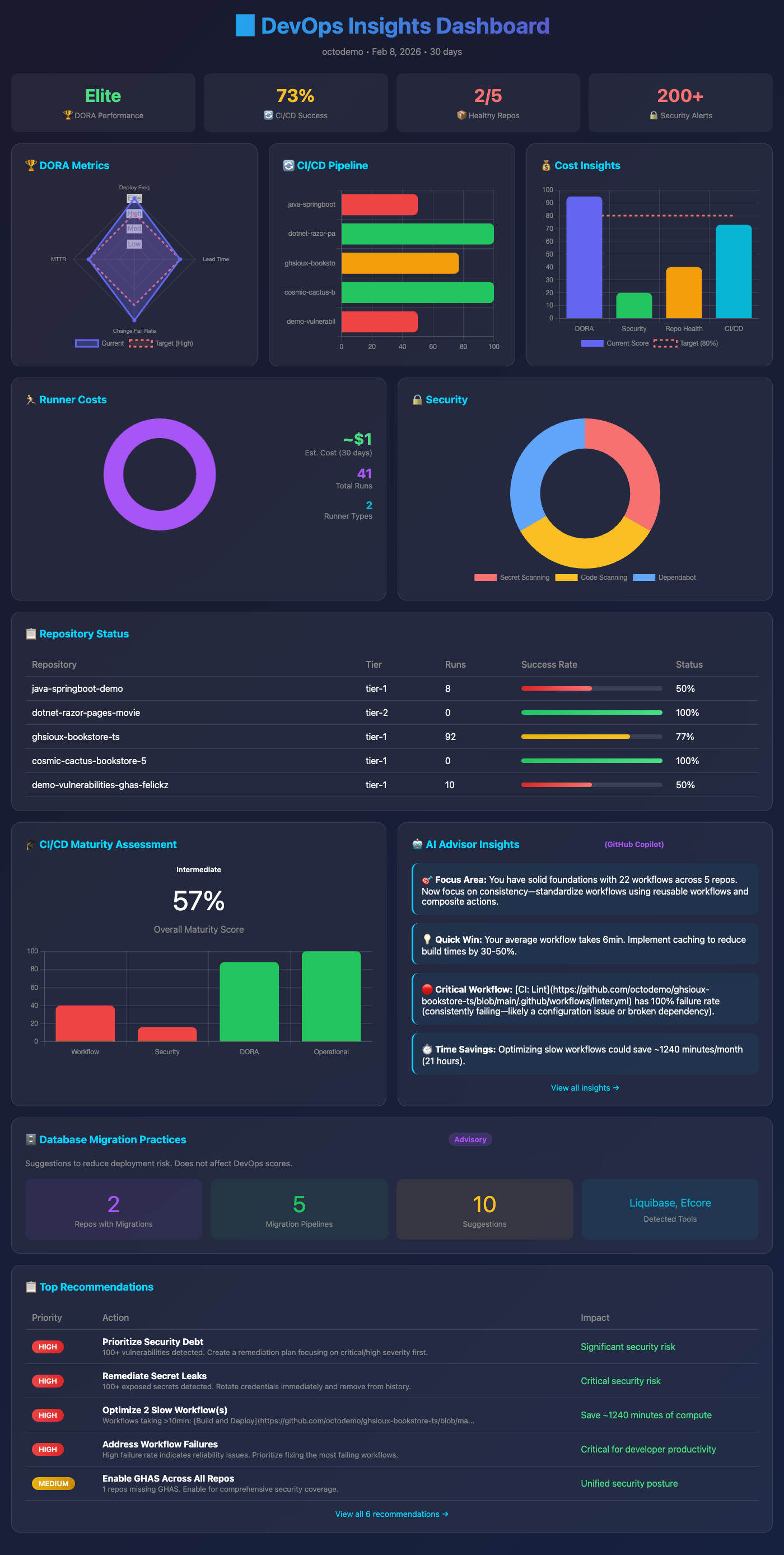
ActionsPulse is an Agentic MCP Server that provides real-time observability of GitHub Actions directly within your IDE, enabling users to generate interactive visual dashboards with actionable insights.
From the registry: Real-time GitHub Actions observability: DORA Metrics, Cost Analysis, CI/CD Health dashboards.




Install & configure
Prerequisites
- requiredInstall DockerActionsPulse is distributed as a Docker image on GitHub Container Registry.https://docs.docker.com/get-docker/
- requiredCreate a GitHub fine-grained Personal Access TokenGenerate a fine-grained PAT scoped to your org with read access to Actions, Administration, Contents, Deployments, Environments, Issues, Metadata, Pull requests, and Custom properties.https://github.com/settings/tokens?type=beta
Install in your client
Paste into the AI you're chatting with — it will figure out the rest
Please install the `actions-pulse` MCP server into my current AI client (that's you).

Required prerequisites (do these first if not already done):
- **Install Docker** — ActionsPulse is distributed as a Docker image on GitHub Container Registry. (https://docs.docker.com/get-docker/)
- **Create a GitHub fine-grained Personal Access Token** — Generate a fine-grained PAT scoped to your org with read access to Actions, Administration, Contents, Deployments, Environments, Issues, Metadata, Pull requests, and Custom properties. (https://github.com/settings/tokens?type=beta)

Canonical MCP server config (stdio transport):
- command: `docker`
- args: ["run","-i","--rm","-e","GITHUB_TOKEN","-e","GITHUB_ORG","ghcr.io/tsviz/actions-pulse:latest"]
- required environment variables:
  - `GITHUB_TOKEN`: GitHub fine-grained Personal Access Token. (example: `<your-github-pat>`)
  - `GITHUB_ORG`: Target GitHub organization to monitor. (example: `my-company`)
- optional environment variables:
  - `DEFAULT_REPO_FILTER`: Comma-separated list of repositories to monitor by default. (example: `my-app,my-api`)
  - `GITHUB_API_URL`: Override GitHub API URL (defaults to https://api.github.com).
  - `GITHUB_ENTERPRISE_SLUG`: Enterprise slug for cross-org / enterprise features.
  - `GITHUB_ENTERPRISE_URL`: GitHub Enterprise Server API URL.
  - `DEVOPS_CONFIG_REPO`: Config repository name (defaults to `devops-config`). (example: `devops-config`)
  - `DEVOPS_CONFIG_PATH`: Local path inside the container for mounted config files. (example: `/app/config`)

Note: By default queries all repos in the organization; filter via `repo_filter` parameter, `inventory.yaml`, or `DEFAULT_REPO_FILTER`.

Add this MCP server to my current client's config in the correct format for you. If you need secrets or credentials I haven't provided, ASK me — do not invent values or leave raw placeholders. After adding it, tell me how to verify the server is connected.
Note: By default queries all repos in the organization; filter via `repo_filter` parameter, `inventory.yaml`, or `DEFAULT_REPO_FILTER`.
Tools (1)
generate_devops_reports
Generates DevOps reports for specified timeframes.
Environment variables
GITHUB_TOKENrequiredPersonal Access Token (fine-grained recommended)GITHUB_ORGrequiredTarget GitHub organization to monitor.Packages
ghcr.io/tsviz/actions-pulse:v2.3.0
ocitransport: stdio
Details
- Language
- TypeScript
- License
- MIT
- Released
- Feb 8, 2026
- Last commit
- Feb 8, 2026
- Registry name
- io.github.tsviz/actions-pulse
Categories
Related Servers
Netdata
Real-time infrastructure monitoring with metrics, logs, alerts, and ML-based anomaly detection.
79.8k
Codebase Memory Mcp
Persistent codebase knowledge graph. Survives session restarts and context compaction.
35.4k
Oh My Posh Validator
Validate oh-my-posh configurations and segment snippets against the official schema.
23.2k