Ai Memory
by alphaonedevcommunityv0.5.1
30
5
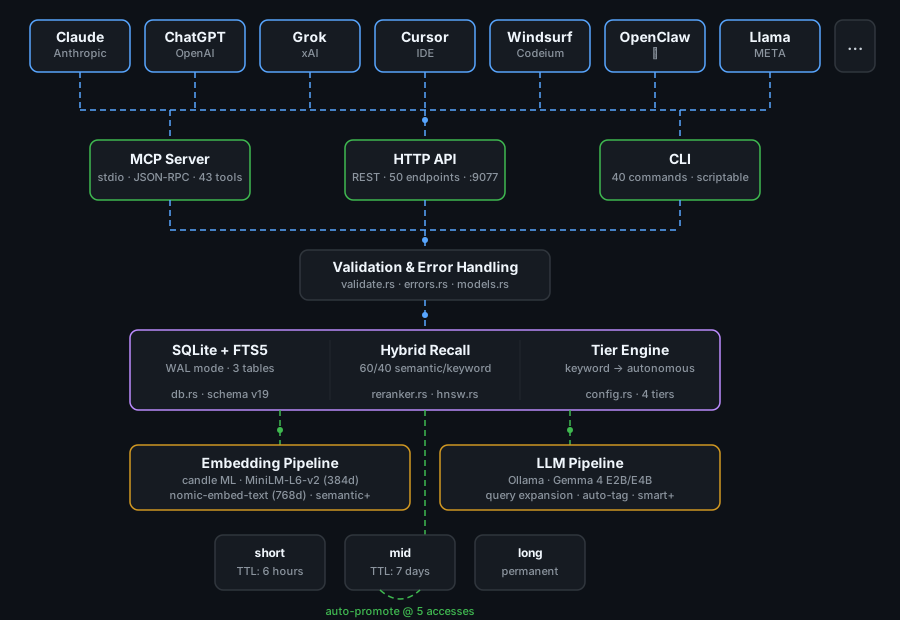
ai-memory is a persistent memory system for AI assistants that stores learned information in a local SQLite database and retrieves relevant memories on demand.
From the registry: Persistent memory for any AI — zero token cost until recall



Install & configure
Prerequisites
- requiredInstall the ai-memory binaryInstall via shell installer, cargo, apt/dnf, or Homebrew. Example (Unix): curl -fsSL https://raw.githubusercontent.com/alphaonedev/ai-memory-mcp/main/install.sh | sh
https://github.com/alphaonedev/ai-memory-mcp$ cargo install ai-memory
Install in your client
Paste into the AI you're chatting with — it will figure out the rest
Please install the `ai-memory` MCP server into my current AI client (that's you).

Required prerequisites (do these first if not already done):
- **Install the ai-memory binary** — Install via shell installer, cargo, apt/dnf, or Homebrew. Example (Unix): curl -fsSL https://raw.githubusercontent.com/alphaonedev/ai-memory-mcp/main/install.sh | sh Run: `cargo install ai-memory` (https://github.com/alphaonedev/ai-memory-mcp)

Canonical MCP server config (stdio transport):
- command: `ai-memory`
- args: ["--db","~/.claude/ai-memory.db","mcp","--tier","semantic"]

Note: Rust binary; local SQLite memory store. --tier options: keyword, semantic (default), smart, autonomous. Smart/autonomous tiers need a local Ollama install.

Add this MCP server to my current client's config in the correct format for you. If you need secrets or credentials I haven't provided, ASK me — do not invent values or leave raw placeholders. After adding it, tell me how to verify the server is connected.
Note: Rust binary; local SQLite memory store. --tier options: keyword, semantic (default), smart, autonomous. Smart/autonomous tiers need a local Ollama install.
Packages
ghcr.io/alphaonedev/ai-memory:0.5.1
ocitransport: stdio
Details
- Language
- Rust
- License
- Apache-2.0
- Released
- Apr 8, 2026
- Last commit
- Jun 21, 2026
- Registry name
- io.github.alphaonedev/ai-memory
Categories
Related Servers
Claude Flow
AI orchestration with hive-mind swarms, neural networks, and 87 MCP tools for enterprise dev.
68.0k
Codebase Memory Mcp
Persistent codebase knowledge graph. Survives session restarts and context compaction.
39.2k
Serena
A powerful toolkit for coding, providing semantic retrieval and editing capabilities.
28.1k