Ambient Context Mcp
by nassie256communityv0.7.1
3
Windows向けの常駐MCPサーバーで、在席状態、フォアグラウンドアプリ種別、バッテリ、電源イベント、システム負荷などのローカル ambient context を、プライバシー分類に基づいてAIクライアントへ公開します。127.0.0.1 のみで待ち受け、Bearerトークン付きの Streamable HTTP で利用します。
From the registry: Local Windows ambient context (presence, foreground app, battery) as privacy-gated MCP tools.





Install & configure
Prerequisites
- requiredWindows OSRequires Windows 10 version 2004 (10.0.19041, May 2020 Update) or later.
- required.NET 8 Desktop Runtime x64Install .NET 8 Desktop Runtime x64 if using the framework-dependent release build.https://dotnet.microsoft.com
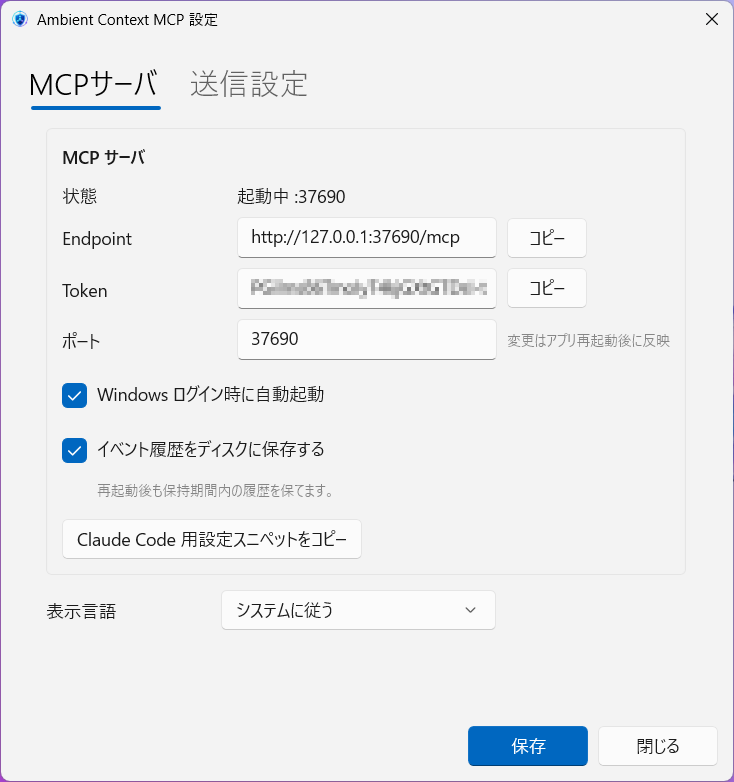
- requiredDownload and run Ambient Context MCP tray appDownload the Windows x64 zip release, extract it, and run ambient-mcp.exe. The tray app hosts the MCP server locally and provides the token and settings UI.
https://github.com/nassie256/ambient-context-mcp/releases$ ambient-mcp.exe - requiredEnable desired context in tray settingsOpen the tray app settings and opt in to the context data you want exposed, then save.
Install in your client
Paste into the AI you're chatting with — it will figure out the rest
Please install the `ambient-context-mcp` MCP server into my current AI client (that's you).

Required prerequisites (do these first if not already done):
- **Windows OS** — Requires Windows 10 version 2004 (10.0.19041, May 2020 Update) or later.
- **.NET 8 Desktop Runtime x64** — Install .NET 8 Desktop Runtime x64 if using the framework-dependent release build. (https://dotnet.microsoft.com)
- **Download and run Ambient Context MCP tray app** — Download the Windows x64 zip release, extract it, and run ambient-mcp.exe. The tray app hosts the MCP server locally and provides the token and settings UI. Run: `ambient-mcp.exe` (https://github.com/nassie256/ambient-context-mcp/releases)
- **Enable desired context in tray settings** — Open the tray app settings and opt in to the context data you want exposed, then save.

Canonical MCP server config (HTTP transport):
- url: `http://127.0.0.1:37690/mcp`
- headers:
  - `Authorization`: `Bearer <TOKEN>`

Note: The server is exposed by a local Windows tray application over Streamable HTTP on 127.0.0.1. A Bearer token is required. The README does not describe a config-file command/args/env shape because non-Claude Desktop clients connect to the already-running local HTTP endpoint.

Add this MCP server to my current client's config in the correct format for you. If you need secrets or credentials I haven't provided, ASK me — do not invent values or leave raw placeholders. After adding it, tell me how to verify the server is connected.
Note: The server is exposed by a local Windows tray application over Streamable HTTP on 127.0.0.1. A Bearer token is required. The README does not describe a config-file command/args/env shape because non-Claude Desktop clients connect to the already-running local HTTP endpoint.
Tools (3)
ambient_context_get_states
現在のコンテキスト状態(presence、battery、foreground app category など)を取得する
ambient_context_poll_events
クライアント別カーソル以降の未読イベント(user_returned、ac_power_connected など)を取得する
ambient_context_get_policy
機微度分類と送信可否の診断情報を返す(実データは含まない)
Packages
https://github.com/nassie256/ambient-context-mcp/releases/download/v0.7.1/ambient-context-mcp-v0.7.1.mcpb
mcpbv0.7.1transport: stdio
Details
- Language
- C#
- License
- MIT
- Released
- Jun 3, 2026
- Last commit
- Jun 3, 2026
- Registry name
- io.github.nassie256/ambient-context-mcp