Entrapulse Polyarchy
by darrenjrobinsoncommunityv0.1.11
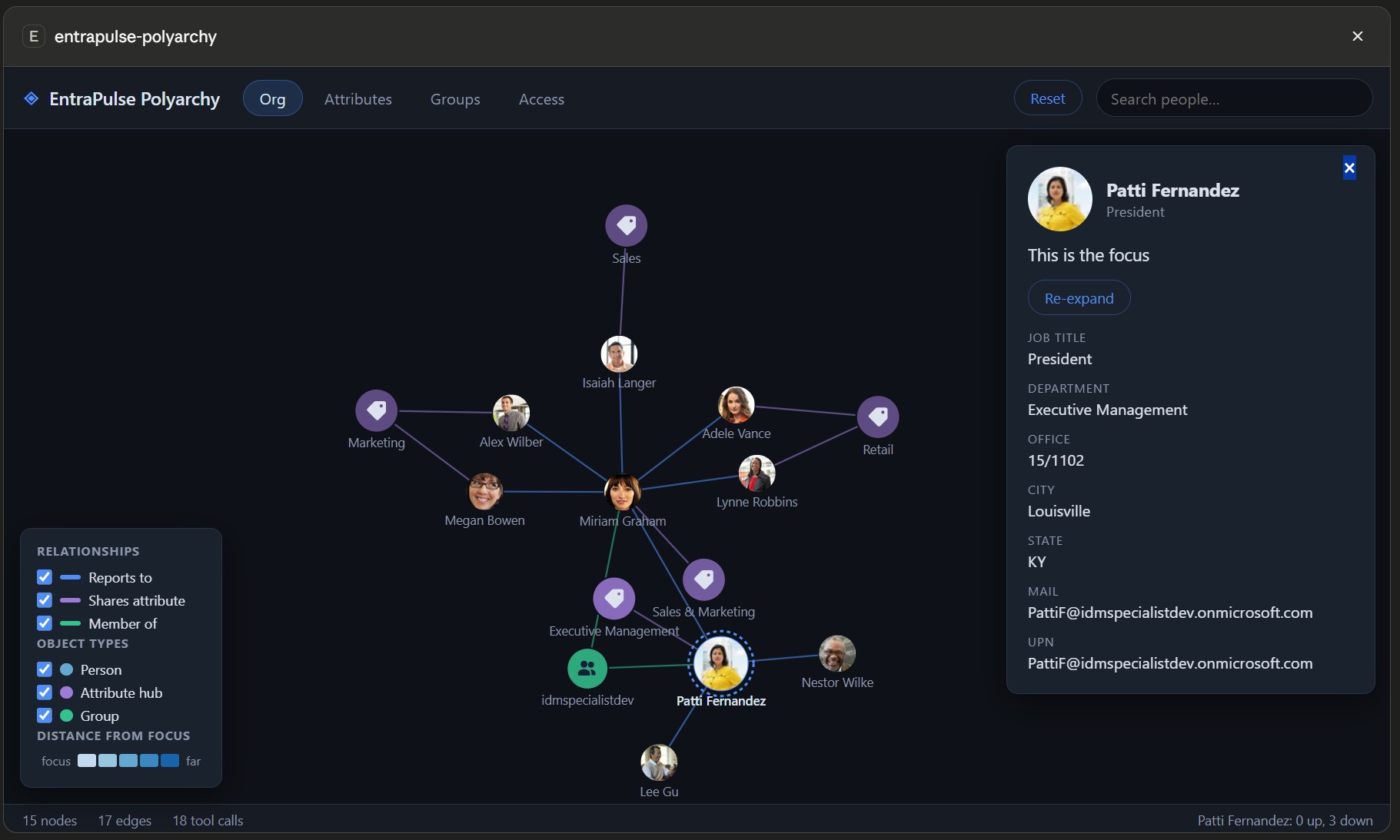
Renders an interactive Microsoft Entra ID identity relationship graph inside an MCP client, showing org hierarchy, group memberships, attributes, roles, and app assignments. It also exposes structured JSON reports of the same identity relationships for assistant reasoning without the UI.
From the registry: Interactive Entra ID identity relationship visualization — the 2003 polyarchy, live as an MCP App



Install & configure
Prerequisites
- required
- requiredMicrosoft Entra ID / Microsoft Graph accessYou need access to a Microsoft Entra ID tenant. By default the server uses interactive sign-in with Microsoft's first-party Graph Command Line Tools public client, so no app registration is needed for most tenants.
- optionalOptional: bring your own Entra app registrationNeeded for hardened tenants or if you want to use your own app in interactive or device-code modes. Register an app, add the portless redirect URI http://localhost, optionally enable public client flows for device code, add delegated Microsoft Graph permissions User.Read.All, Group.Read.All, RoleManagement.Read.Directory, and Application.Read.All, then grant admin consent.
Install in your client
Paste into the AI you're chatting with — it will figure out the rest
Please install the `entrapulse-polyarchy` MCP server into my current AI client (that's you).

Required prerequisites (do these first if not already done):
- **Node.js and npm** — Install Node.js so the server can be launched via npx. (https://nodejs.org/)
- **Microsoft Entra ID / Microsoft Graph access** — You need access to a Microsoft Entra ID tenant. By default the server uses interactive sign-in with Microsoft's first-party Graph Command Line Tools public client, so no app registration is needed for most tenants.

Optional prerequisites:
- Optional: bring your own Entra app registration — Needed for hardened tenants or if you want to use your own app in interactive or device-code modes. Register an app, add the portless redirect URI http://localhost, optionally enable public client flows for device code, add delegated Microsoft Graph permissions User.Read.All, Group.Read.All, RoleManagement.Read.Directory, and Application.Read.All, then grant admin consent.

Canonical MCP server config (stdio transport):
- command: `npx`
- args: ["-y","entrapulse-polyarchy"]
- optional environment variables:
  - `TENANT_ID`: Microsoft Entra tenant ID. Optional for default interactive auth, but useful to pin sign-in to a specific tenant. Required together with CLIENT_ID for bring-your-own app interactive/device-code auth, and required for app-only auth. (example: `<your-tenant-guid>`)
  - `CLIENT_ID`: App registration client ID. Optional in default interactive mode because the server can use Microsoft's first-party Graph Command Line Tools client. Required with TENANT_ID for bring-your-own app interactive/device-code auth, and required for app-only auth. (example: `<your-app-registration-client-id>`)
  - `CLIENT_SECRET`: App registration client secret for app-only authentication. Required only for app-only mode; when used, you must also set TENANT_ID and CLIENT_ID. (example: `<your-client-secret>`)
  - `USE_DEVICE_CODE`: Set to true to use device-code authentication instead of browser-based interactive sign-in. Common for headless or SSH environments. (example: `true`)
  - `USE_CLIENT_TOKEN`: Set to true to use a bearer token supplied by the MCP client via the set-access-token tool instead of the server acquiring its own token. (example: `true`)
  - `ACCESS_TOKEN`: Optional initial Microsoft Graph bearer token when using client-provided token mode. (example: `<your-access-token>`)
  - `POLYARCHY_DISABLE_TOKEN_CACHE`: Set to true to disable OS-keychain token persistence. (example: `true`)
  - `POLYARCHY_AUTH_RECORD`: Path to the persisted sign-in record file. Delete the file at this path to force a fresh sign-in. (example: `<path-to-auth-record.json>`)

Note: Default auth mode is interactive sign-in on first tool call, with no env vars required. In app-only mode there is no /me context, so callers must provide a person to visualize-identity or polyarchy-report. The README only documents stdio launch via npx.

Add this MCP server to my current client's config in the correct format for you. If you need secrets or credentials I haven't provided, ASK me — do not invent values or leave raw placeholders. After adding it, tell me how to verify the server is connected.
Note: Default auth mode is interactive sign-in on first tool call, with no env vars required. In app-only mode there is no /me context, so callers must provide a person to visualize-identity or polyarchy-report. The README only documents stdio launch via npx.
Tools (6)
visualize-identity
Open the polyarchy focused on the current user or a searched user/object ID.
polyarchy-expand
Return relationship data for one node as a nodes/edges delta, including org, groups, access, and attribute cohorts.
polyarchy-search
Find people by name or UPN and return matching users with title, department, and object ID.
polyarchy-report
Return a structured JSON report of a user's relationships, including manager chain, direct reports, groups, roles, app assignments, and core attributes.
set-access-token
Provide a Graph access token to the server for client-provided token auth mode.
get-auth-status
Show current authentication status, account, app registration, and scopes.
Environment variables
TENANT_IDPins sign-in to a specific Microsoft Entra tenant or configures a custom app registration tenant.CLIENT_IDClient ID for using your own app registration instead of the default Microsoft Graph Command Line Tools app.CLIENT_SECRETClient secret for app-only authentication mode.Packages
entrapulse-polyarchy
npmv0.1.11transport: stdio
Details
- Language
- JavaScript
- License
- MIT
- Released
- Jul 5, 2026
- Last commit
- Jul 5, 2026
- Registry name
- io.github.darrenjrobinson/entrapulse-polyarchy