Memory Vault
by MihaiBuildscommunityv1.0.6
60
11
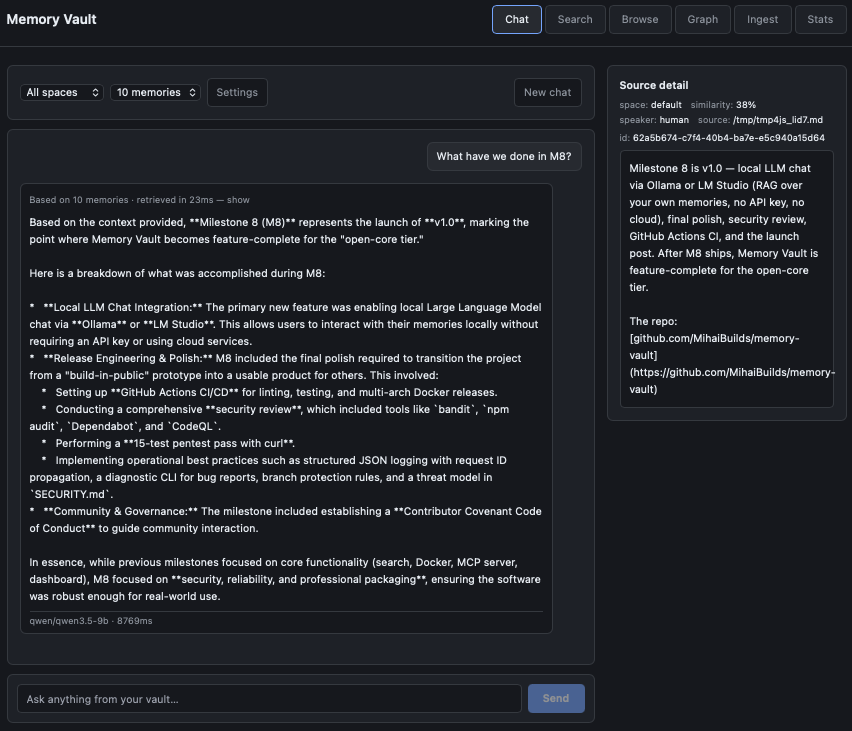
Memory Vault is a self-hosted memory database for AI applications built on PostgreSQL and pgvector. It stores memories, supports hybrid semantic plus keyword search, and exposes them through MCP, a REST API, a CLI, and a web dashboard.
From the registry: Local-first AI memory layer with hybrid search. Postgres + pgvector. Self-hosted, MIT.

Install & configure
Prerequisites
- requiredInstall Python 3.11+Python 3.11 or newer is required to run the MCP server on the host.
- requiredRun Memory Vault backendStart Memory Vault so the MCP server can connect to its PostgreSQL database. The README's simplest path is Docker Compose from the repository root.
https://github.com/MihaiBuilds/memory-vault$ git clone https://github.com/MihaiBuilds/memory-vault.git && cd memory-vault && docker compose up -d - requiredInstall Python package dependenciesIf running the MCP server from the repository on the host, create a virtual environment and install the project so `python -m src.mcp` works.
$ cd /path/to/memory-vault && python -m venv .venv && source .venv/bin/activate && pip install -e .
Install in your client
Paste into the AI you're chatting with — it will figure out the rest
Please install the `memory-vault` MCP server into my current AI client (that's you).

Required prerequisites (do these first if not already done):
- **Install Python 3.11+** — Python 3.11 or newer is required to run the MCP server on the host.
- **Run Memory Vault backend** — Start Memory Vault so the MCP server can connect to its PostgreSQL database. The README's simplest path is Docker Compose from the repository root. Run: `git clone https://github.com/MihaiBuilds/memory-vault.git && cd memory-vault && docker compose up -d` (https://github.com/MihaiBuilds/memory-vault)
- **Install Python package dependencies** — If running the MCP server from the repository on the host, create a virtual environment and install the project so `python -m src.mcp` works. Run: `cd /path/to/memory-vault && python -m venv .venv && source .venv/bin/activate && pip install -e .`

Canonical MCP server config (stdio transport):
- command: `python`
- args: ["-m","src.mcp"]
- required environment variables:
  - `PYTHONPATH`: Path to the Memory Vault repository so the `src.mcp` module can be imported. (example: `<path-to-memory-vault>`)
  - `DB_HOST`: PostgreSQL host for Memory Vault. If using Docker per the README, point this at the Docker host. (example: `<your-db-host>`)
  - `DB_PORT`: PostgreSQL port. (example: `<your-db-port>`)
  - `DB_NAME`: Memory Vault database name. (example: `<your-db-name>`)
  - `DB_USER`: PostgreSQL username. (example: `<your-db-user>`)
  - `DB_PASSWORD`: PostgreSQL password. (example: `<your-db-password>`)

Note: The README specifies FastMCP stdio transport for MCP. The example config also includes a client-specific `cwd`, but canonical MCP config should only include command, args, and env. The MCP server runs on the host, not inside Docker; when using the Docker deployment, ensure PostgreSQL is reachable from the host.

Add this MCP server to my current client's config in the correct format for you. If you need secrets or credentials I haven't provided, ASK me — do not invent values or leave raw placeholders. After adding it, tell me how to verify the server is connected.
Note: The README specifies FastMCP stdio transport for MCP. The example config also includes a client-specific `cwd`, but canonical MCP config should only include command, args, and env. The MCP server runs on the host, not inside Docker; when using the Docker deployment, ensure PostgreSQL is reachable from the host.
Tools (4)
recall
Search memories with hybrid search (vector + full-text + RRF)
remember
Store a new memory, with auto-classification and embeddings
forget
Soft-delete a memory by chunk ID
memory_status
Report database health, chunk counts, and embedding model info
Environment variables
DB_PASSWORDrequiredPostgreSQL password used by the MCP server to connect to the databasePrerequisites
- • Python 3.11+
Packages
ghcr.io/mihaibuilds/memory-vault-mcp:1.0.6
ocitransport: stdio
Details
- Language
- Python
- License
- MIT
- Released
- May 18, 2026
- Last commit
- Aug 17, 2026
- Registry name
- io.github.MihaiBuilds/memory-vault