Parlament Mcp
by malkreidecommunityv0.3.5
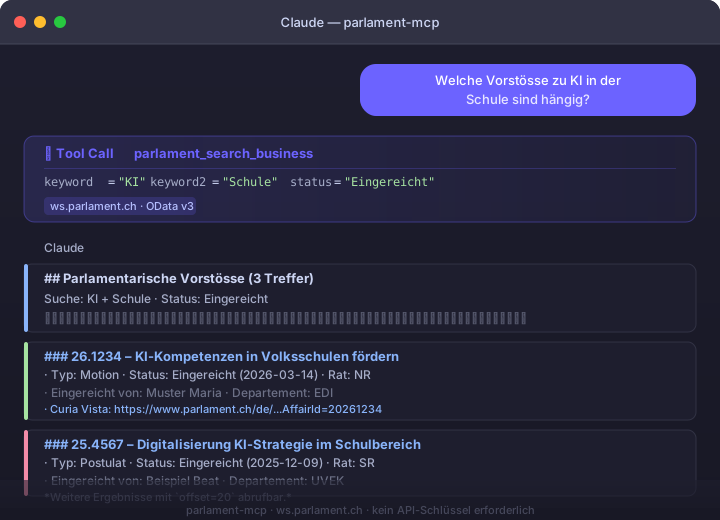
An MCP server that connects AI models to the Swiss Federal Parliament’s Curia Vista OData API. It lets clients search parliamentary business, inspect individual items, look up members, votes, sessions, and debate transcripts without requiring an API key.
From the registry: Swiss Federal Parliament Curia Vista OData API




Install & configure
Prerequisites
- requiredInstall uvInstall Astral's uv so you can run the server via uvx without cloning the repository.https://docs.astral.sh/uv/}?
Install in your client
Paste into the AI you're chatting with — it will figure out the rest
Please install the `parlament-mcp` MCP server into my current AI client (that's you).

Required prerequisites (do these first if not already done):
- **Install uv** — Install Astral's uv so you can run the server via uvx without cloning the repository. (https://docs.astral.sh/uv/}?)

Canonical MCP server config (stdio transport):
- command: `uvx`
- args: ["parlament-mcp"]

Note: The simplest portable install path is stdio via `uvx parlament-mcp`. The README also documents SSE/HTTP-style deployment for cloud use, with transport controlled by `MCP_TRANSPORT` (`stdio` default, `sse` or `streamable-http`) plus host/port environment variables, but it does not provide a canonical client HTTP config snippet. No API key is required for the underlying Swiss Parliament data source. Optional server-side env vars mentioned in the README for non-stdio deployments include `MCP_TRANSPORT`, `MCP_HOST`, `PORT`, `MCP_BEARER_TOKENS`, `MCP_ALLOWED_ORIGINS`, and observability variable `OTEL_EXPORTER_OTLP_ENDPOINT`.

Add this MCP server to my current client's config in the correct format for you. If you need secrets or credentials I haven't provided, ASK me — do not invent values or leave raw placeholders. After adding it, tell me how to verify the server is connected.
Note: The simplest portable install path is stdio via `uvx parlament-mcp`. The README also documents SSE/HTTP-style deployment for cloud use, with transport controlled by `MCP_TRANSPORT` (`stdio` default, `sse` or `streamable-http`) plus host/port environment variables, but it does not provide a canonical client HTTP config snippet. No API key is required for the underlying Swiss Parliament data source. Optional server-side env vars mentioned in the README for non-stdio deployments include `MCP_TRANSPORT`, `MCP_HOST`, `PORT`, `MCP_BEARER_TOKENS`, `MCP_ALLOWED_ORIGINS`, and observability variable `OTEL_EXPORTER_OTLP_ENDPOINT`.
Tools (6)
parlament_search_business
Search Vorstösse by keyword, type, status, council, and date
parlament_get_business
Get full details of a single business, including texts and FC response
parlament_search_members
Find councillors by canton, party, and council
parlament_get_votes
Retrieve parliamentary votes with Ja/Nein meaning
parlament_get_sessions
List recent sessions with IDs for follow-up queries
parlament_get_transcripts
Fetch debate excerpts by keyword or speaker from the Amtliches Bulletin
Environment variables
MCP_TRANSPORTrequiredSelects the MCP transport mode (stdio default, or sse/streamable-http)Packages
parlament-mcp
pypiv0.3.5transport: stdio
Details
- Language
- Python
- License
- MIT
- Released
- Aug 2, 2026
- Last commit
- Jun 8, 2026
- Registry name
- io.github.malkreide/parlament-mcp