Dbgprobe Mcp Server
by es617communityv0.1.4
7
1
An MCP server for interacting with on-chip debug probes over stdio, initially using SEGGER J-Link to flash, debug, inspect memory, manage breakpoints, and read RTT output from embedded targets. It also supports attaching ELF and SVD files for symbol-aware debugging and register-level peripheral access.
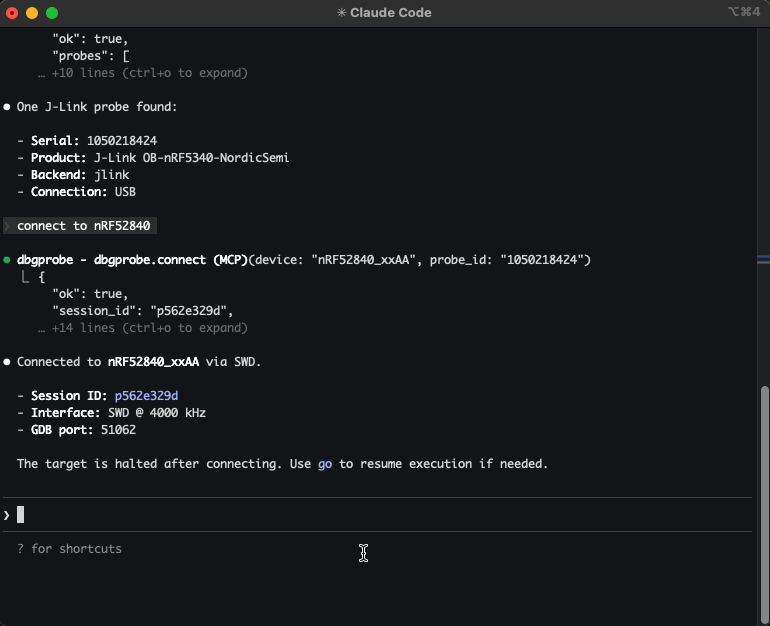
From the registry: Let AI agents interact with debug probes — connect, flash, read/write memory, and reset.






Install & configure
Prerequisites
- requiredPython 3.11+Python 3.11 or later.
- requiredInstall dbgprobe-mcp-serverInstall from PyPI.
$ pip install dbgprobe-mcp-server - requiredSEGGER J-Link Software PackInstall J-Link software; the server auto-detects JLinkExe or set DBGPROBE_JLINK_PATH.https://www.segger.com/downloads/jlink/
Install in your client
Paste into the AI you're chatting with — it will figure out the rest
Please install the `dbgprobe-mcp-server` MCP server into my current AI client (that's you).

Required prerequisites (do these first if not already done):
- **Python 3.11+** — Python 3.11 or later.
- **Install dbgprobe-mcp-server** — Install from PyPI. Run: `pip install dbgprobe-mcp-server`
- **SEGGER J-Link Software Pack** — Install J-Link software; the server auto-detects JLinkExe or set DBGPROBE_JLINK_PATH. (https://www.segger.com/downloads/jlink/)

Canonical MCP server config (stdio transport):
- command: `dbgprobe_mcp`
- args: []
- optional environment variables:
  - `DBGPROBE_BACKEND`: Debug probe backend (jlink; openocd/pyocd planned) (example: `jlink`)
  - `DBGPROBE_JLINK_PATH`: Explicit path to JLinkExe (example: `/Applications/SEGGER/JLink/JLinkExe`)
  - `DBGPROBE_JLINK_GDBSERVER_PATH`: Explicit path to JLinkGDBServerCLExe
  - `DBGPROBE_JLINK_DEVICE`: Default target device (example: `nRF52840_xxAA`)
  - `DBGPROBE_INTERFACE`: Debug interface (SWD or JTAG) (example: `SWD`)
  - `DBGPROBE_SPEED_KHZ`: Interface clock speed in kHz (example: `4000`)
  - `DBGPROBE_MCP_LOG_LEVEL`: Python log level (example: `WARNING`)
  - `DBGPROBE_MCP_TOOL_SEPARATOR`: Character for tool name segments (set to _ for Cursor) (example: `_`)
  - `DBGPROBE_MCP_PLUGINS`: Plugin policy (all or comma list) (example: `all`)
  - `DBGPROBE_MCP_TRACE`: JSONL trace of every tool call (example: `1`)

Add this MCP server to my current client's config in the correct format for you. If you need secrets or credentials I haven't provided, ASK me — do not invent values or leave raw placeholders. After adding it, tell me how to verify the server is connected.
Tools (41)
dbgprobe.probes.list
List attached debug probes
dbgprobe.connect
Connect to a selected debug probe and target
dbgprobe.erase
Erase target flash
dbgprobe.disconnect
Disconnect from the target
dbgprobe.reset
Reset the target
dbgprobe.halt
Halt the target CPU
dbgprobe.go
Resume execution on the target
dbgprobe.step
Single-step target execution
dbgprobe.status
Get current target/debug session status
dbgprobe.flash
Flash firmware to the target
dbgprobe.mem.read
Read target memory
dbgprobe.mem.write
Write target memory
dbgprobe.breakpoint.set
Set a breakpoint
dbgprobe.breakpoint.clear
Clear a breakpoint
dbgprobe.breakpoint.list
List breakpoints
Demos
Packages
dbgprobe-mcp-server
pypiv0.1.4transport: stdio
Details
- Language
- Python
- License
- MIT
- Released
- Mar 13, 2026
- Last commit
- Mar 14, 2026
- Registry name
- io.github.es617/dbgprobe-mcp-server