Ddc Ci Control Bridge
by Defozocommunityv1.0.5
5
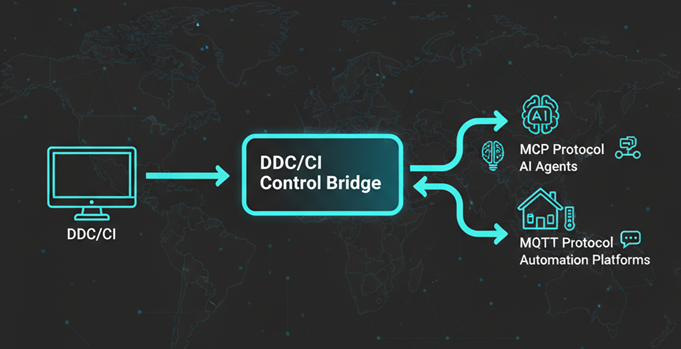
The DDC/CI Control Bridge is a multi-protocol server that enables DDC/CI monitor control and supports integration with AI/agent systems via the Model Context Protocol (MCP) and MQTT.
From the registry: Control monitor brightness, contrast, power and input via DDC/CI with MCP and MQTT support.




Install & configure
Prerequisites
- requiredDDC/CI-enabled monitorMonitor must support DDC/CI (enable in OSD). On Linux, add your user to the i2c group and load i2c-dev.
$ sudo usermod -a -G i2c $USER && sudo modprobe i2c-dev
Install in your client
Paste into the AI you're chatting with — it will figure out the rest
Please install the `ddc-ci-control-bridge` MCP server into my current AI client (that's you).

Required prerequisites (do these first if not already done):
- **DDC/CI-enabled monitor** — Monitor must support DDC/CI (enable in OSD). On Linux, add your user to the i2c group and load i2c-dev. Run: `sudo usermod -a -G i2c $USER && sudo modprobe i2c-dev`

Canonical MCP server config (stdio transport):
- command: `npx`
- args: ["-y","ddc-ci-control-bridge"]
- optional environment variables:
  - `MQTT_ENABLED`: Enable MQTT client (example: `false`)
  - `MQTT_HOST`: MQTT broker host (example: `localhost`)
  - `MQTT_PORT`: MQTT broker port (example: `1883`)
  - `MQTT_USERNAME`: MQTT username (example: `ddc-mcp`)
  - `MQTT_PASSWORD`: MQTT password
  - `DDC_API_KEY`: API key for server authentication (required for HTTP/SSE transport and standalone executable) (example: `<your_api_key>`)
  - `MCP_TRANSPORT`: Transport type: sse or stdio (example: `stdio`)
  - `MCP_PORT`: HTTP port for SSE transport (example: `8000`)

Add this MCP server to my current client's config in the correct format for you. If you need secrets or credentials I haven't provided, ASK me — do not invent values or leave raw placeholders. After adding it, tell me how to verify the server is connected.
Environment variables
DDC_API_KEYrequiredAPI key required for the executable to run.Packages
ddc-ci-control-bridge
npmv1.0.5transport: stdio
Details
- Language
- TypeScript
- License
- MIT
- Released
- Oct 15, 2025
- Last commit
- Feb 2, 2026
- Registry name
- io.github.Defozo/ddc-ci-control-bridge